
|
Posting pictures???!!
O.K. Help an old dumb fart out. How do you post pictures on a thread?
|
RE: Posting pictures???!!
Couple different ways........If you have a photobucket account (which is free, and prolly the easiest, by the way www.photobucket.com) you can upload them from your computer to photobucket. From there you can make them a little smaller, and copy/paste the image tag below the image. Paste the tag in your post and change the
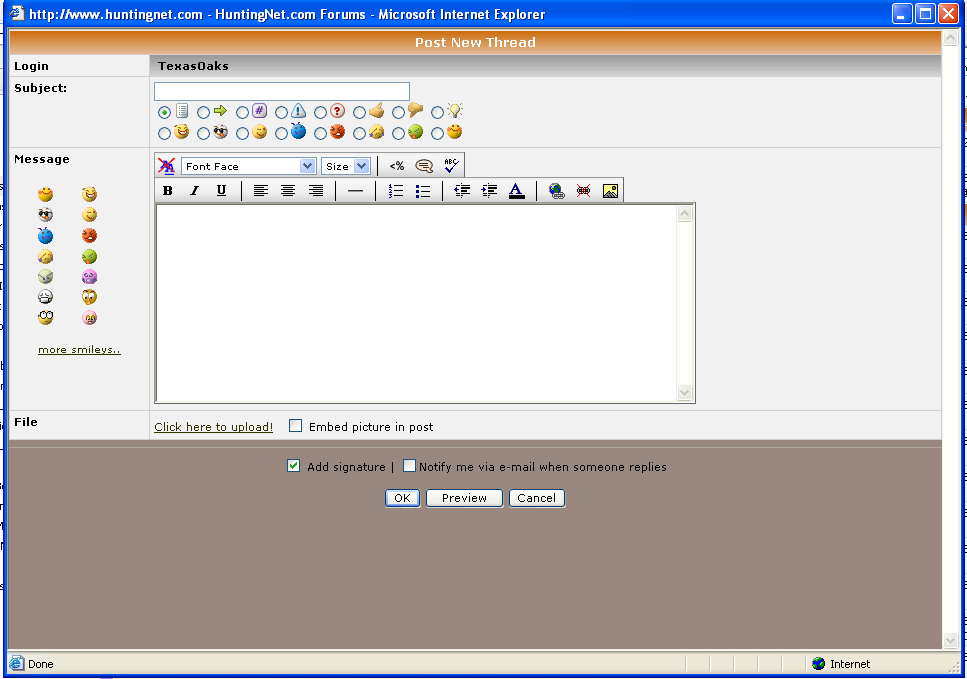
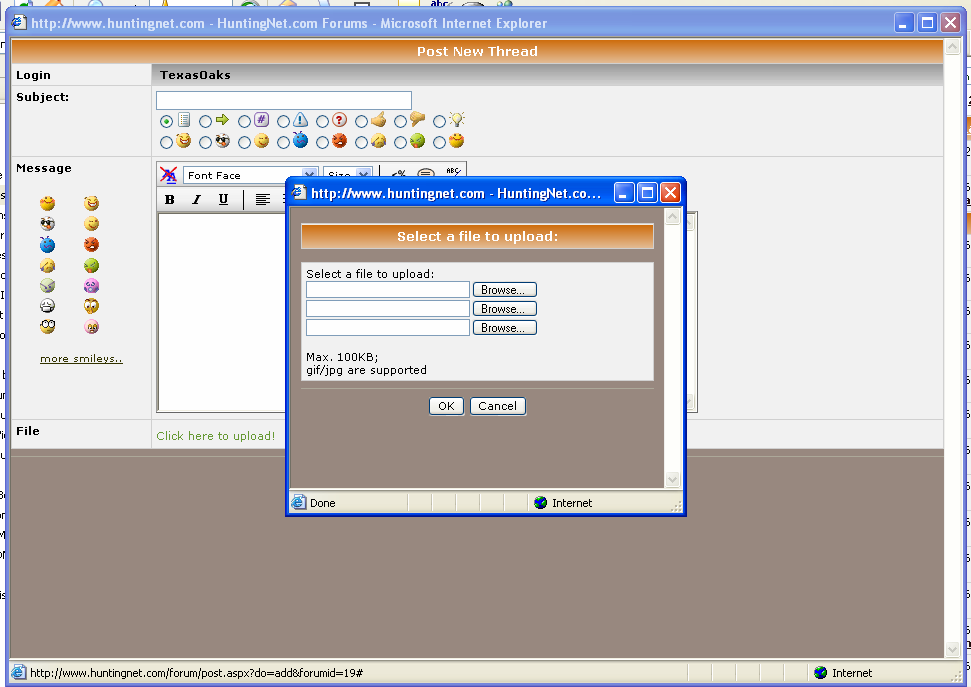
Or you can upload them straight to your computer. You will need photoshop or some other program to resize them because if doing this method the photo needs to be under 100kb. At the bottom of the message window it reads "Click here to upload!" and next to it is "Embed picture in post" check that box and click the link. Click the browse button and find your photo....then upload. Sounds alot more difficult than it is....It's really very simple. |
RE: Posting pictures???!!
First you need a picture in your computer somewhere. Then it needs to be resized to under 100kb. You should have some sort of photo editing software where you can do this on your computer or ms paint might work.Then you click on Embed pic in post at the bottom of page, and click here to upload. Then find the picture in your computers memory and double click on it.
Or you can use www.photobucket.com and upload your pics there. I am not a photobucket expert, so maybe someone else can help you out there. Hope this helps and makes some sense to you. |
RE: Posting pictures???!!
I think I'm getting it.
The pic;s are an email attachment and I open them in Adobe photo shop. I can rename them and save to my documents. Why would I have to join or download some other software? When I try and "Add Imahe" on this rely for instance, it wants to know image URL and starts with http:\\ . . .??! I don't know how to do URL or create an http. I upload pic's all the time on eBay or emails, but this has me befuddled.  This box with red X is what I get when using my feeble method. And what's the deal with "Avatar"? |
RE: Posting pictures???!!
Thanks. I think I finally managed to make an avatar...
|
RE: Posting pictures???!!
game4,
Look under "Technical Help" under the Technical/Forum Help Section. It has a sticky with detailed step by step instructions on how to post pics. That's how I learned. |
RE: Posting pictures???!!
Allright!!!!!!!!!
I never scrolled down that far!! |
RE: Posting pictures???!!
Start by clicking new post. Then to click to upload here. Attach files by browsing through your files on your computer. Files uploadedhave to be 100mb or less I believe to load. Press OK to load. Then make sure embed picture in post is checked. You are done sir.
  |
RE: Posting pictures???!!
I'm getting closed. I tried what you have described, it says my files are too large. How do I compress them or whatever?
|
RE: Posting pictures???!!
Man I must be dumb, I have been tryn to post pics since I joined and still can't. I have the pics. saved on the photobucket, but how do I get them saved to my computer or send them here?
|
RE: Posting pictures???!!
HELP Please
|
RE: Posting pictures???!!
Sportsfann....I'll help you out.
Everyone....Sportsfann emailed me this. Meet Sportsfann! Welcome aboard!! :D:eek::D  |
RE: Posting pictures???!!
Funny, I give up!
|
RE: Posting pictures???!!
man sportsfann you look like Rob
|
RE: Posting pictures???!!
Step 1
Click the picture Icon all the way to the right  |
RE: Posting pictures???!!
Step 2 a box will appear
 |
RE: Posting pictures???!!
Step 3
post the URL of the picture in box click OK  |
RE: Posting pictures???!!
Sportsfann.....I got your other email. Want me to post some more???
:D:D |
RE: Posting pictures???!!
I got that, but I can not make the picture small enough. Even tried the photobucket, but cannot save them on my computer or send the to the post?
|
RE: Posting pictures???!!
Dude I used photobucket;) It will work:)
|
RE: Posting pictures???!!
Germ,
You like to work even when your not working! ;) Sportsfann, Photobucket gives you a URL link, highlight and copy, then click on the mountain/pic icon in the message and paste the link in the box. Maybe your connection is too slow. Sometimes it can take a while. |
RE: Posting pictures???!!
I just finshed a project that is do in 2 weeks:D
My co-workers upgradejust blew up, and now I have to fix it[:@] |
RE: Posting pictures???!!
Guys Im sorry but where is the mountauin icon?
|
RE: Posting pictures???!!
To the far right of the tool bar on a reply post from B I U....
 SEE: http://www.huntingnet.com/forum/tm.aspx?m=1735212 |
| All times are GMT -8. The time now is 06:05 AM. |
Copyright © 2026 MH Sub I, LLC dba Internet Brands. All rights reserved. Use of this site indicates your consent to the Terms of Use.