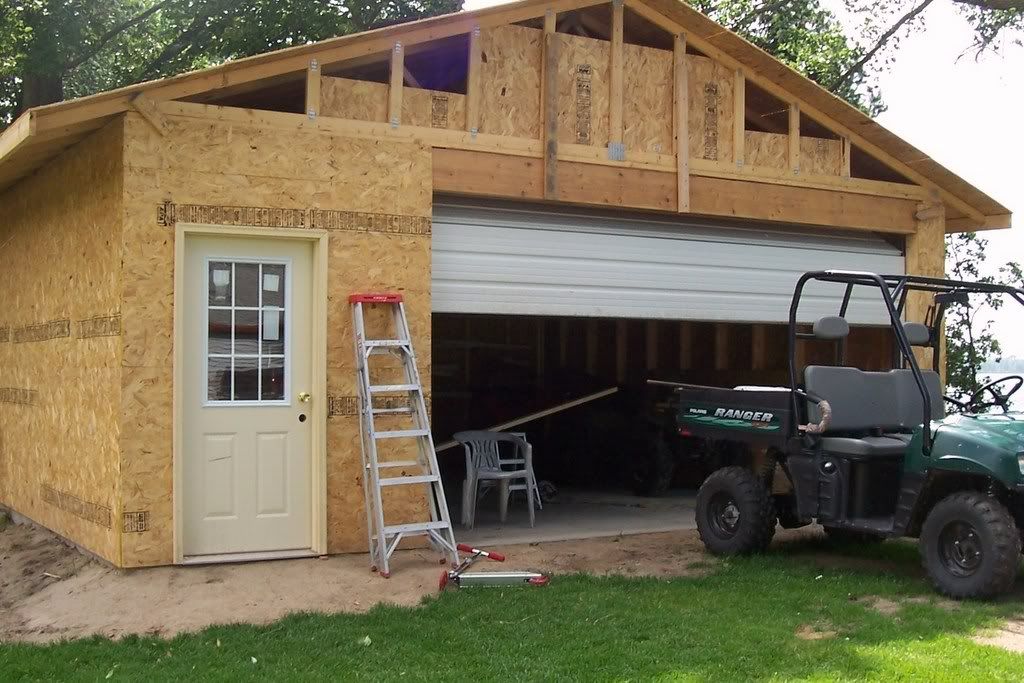
|
Hope this helps!!
I know a few of you have had a bunch of trouble getting pics posted, took me a long time myself! If you use Huntingnets method you have to resize the pic and sometimes that is not fun and you can end up with a thumbnail pic that is to small to see! Hunting net recommends using a photo host site to post pics, one they endorse is Photo bucket.com, it is the one I use and have no problems with, an no resizing! The trail cam gallery has a help thread, but photo bucket has changed a little so this is a step by step thread on how to set up a free Photo bucket account and get your pics on here so all can see! This is for one friend in particular so I hope this helps since it took me an hour to do! Nothing to download, its free, and it works! Mods please do not move this thread, only trying to help some friends out!
Step 1..... OK here is the first of many pics, first group is on setting up your Photo Bucket account. Just go to www.photobucket.com and this will be the first thing you see. Click the red join now tab. 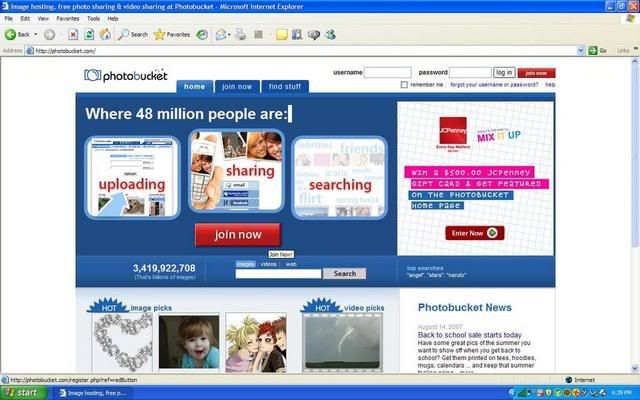 Step 2..... After you click it, this screen will come up. Make up a user name and a password and click next step. 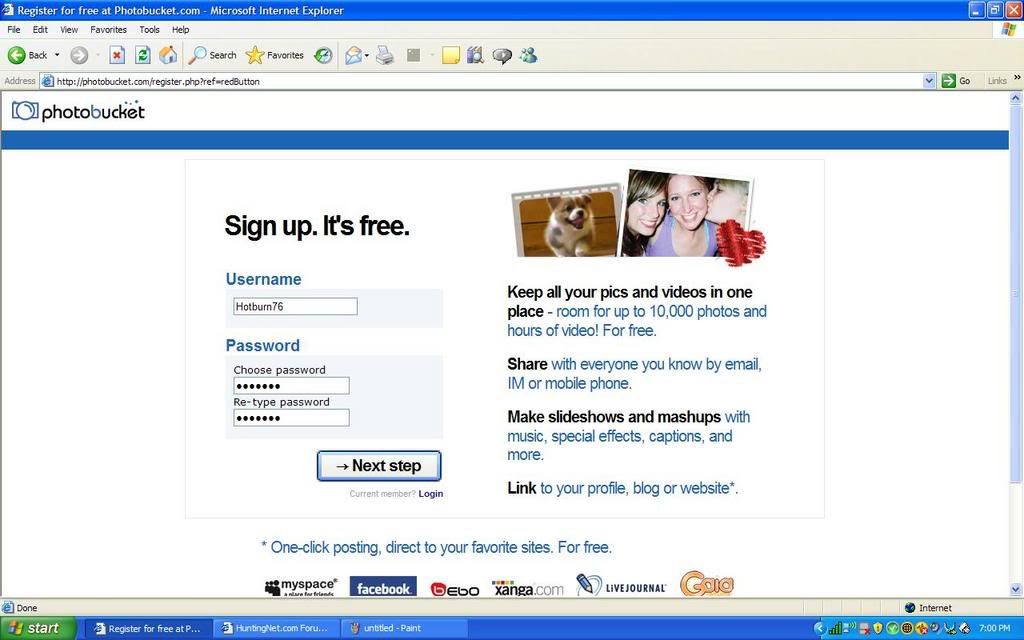 Step 3..... This is what you will see next. Type in all your info. I am not sure what all is required. I did not put in a cell number, no thank you!! And it did not give me a problem. You must have a current email address and just make up a name and birthday that makes you at least 18 and you should be good to go! Click the accept tab and move on!!  Step 4..... You should now have set up a account and it will take you to this screen. Upload your pics by clicking on the browse tab next to the pretty little lady and a box will pop up... 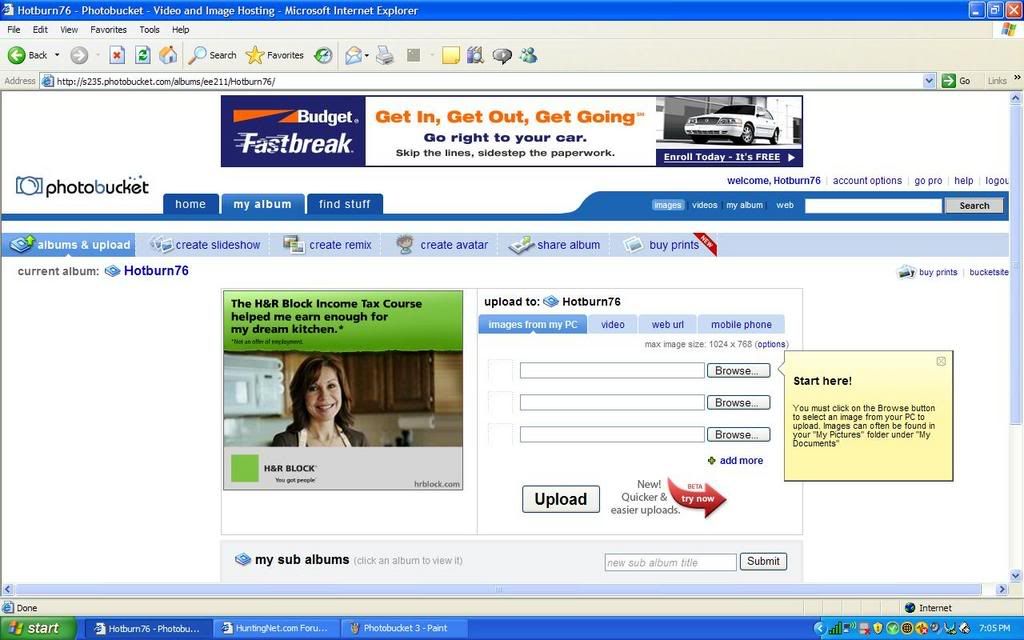 Step 5..... This is the box, it is your computer's folders. You need to find your pics where you saved them. Find your pics.... 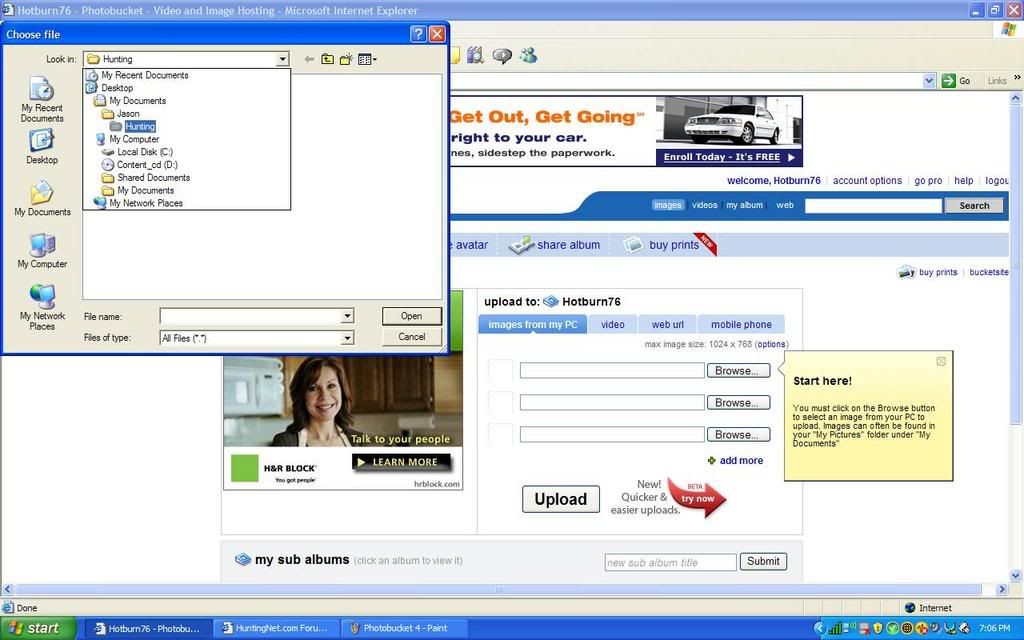 Step 6..... As a example you can see I have mine under My Documents in a hunting folder. At this point I can not help you find your pics, they are in your computer! Find them cause we want to see them!!! Find the pic and then just double click on it. 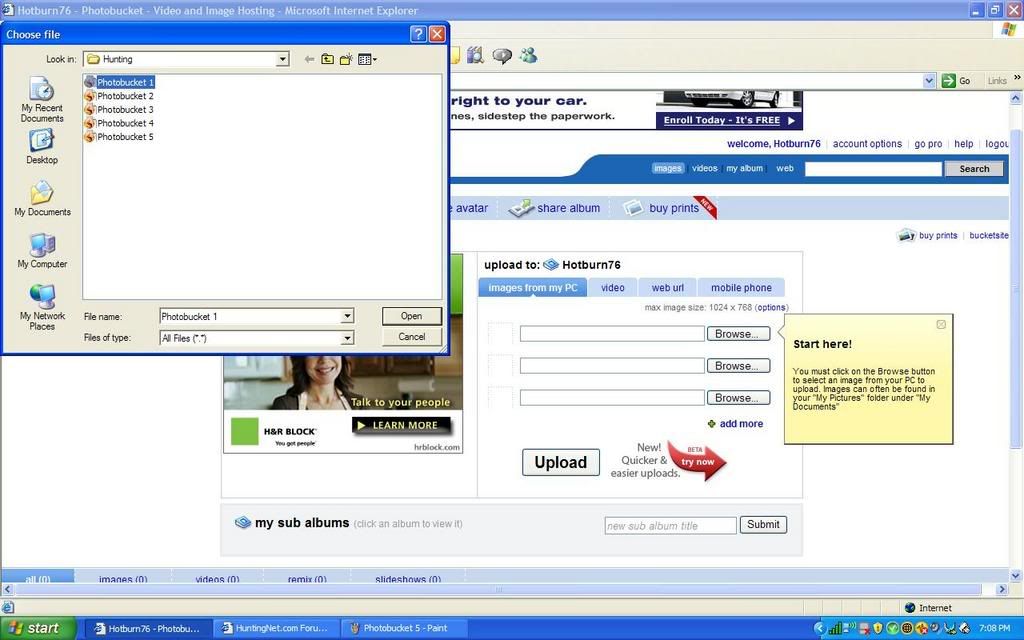 Step 7..... Your pic name should have filled in the blank browse tab with your computers name above it. You can type in another name for it but I do not most of the time. Click the upload button.... 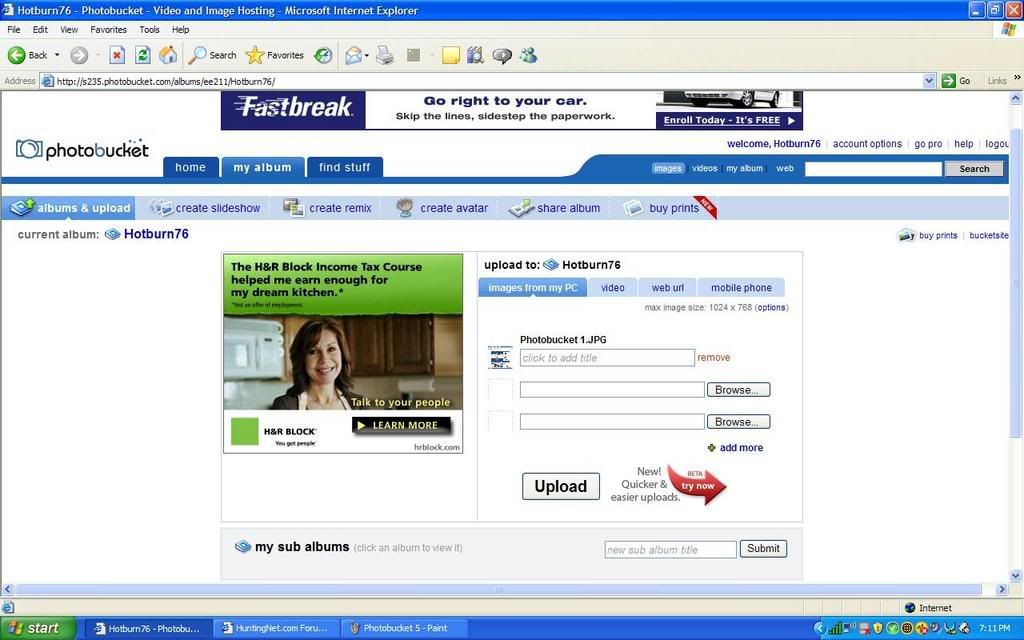 Step 8..... This will be the screen that pops up while they are loading, if you have dial up you may see this for a while, it was a 100% by the time i could save it with cable modem! 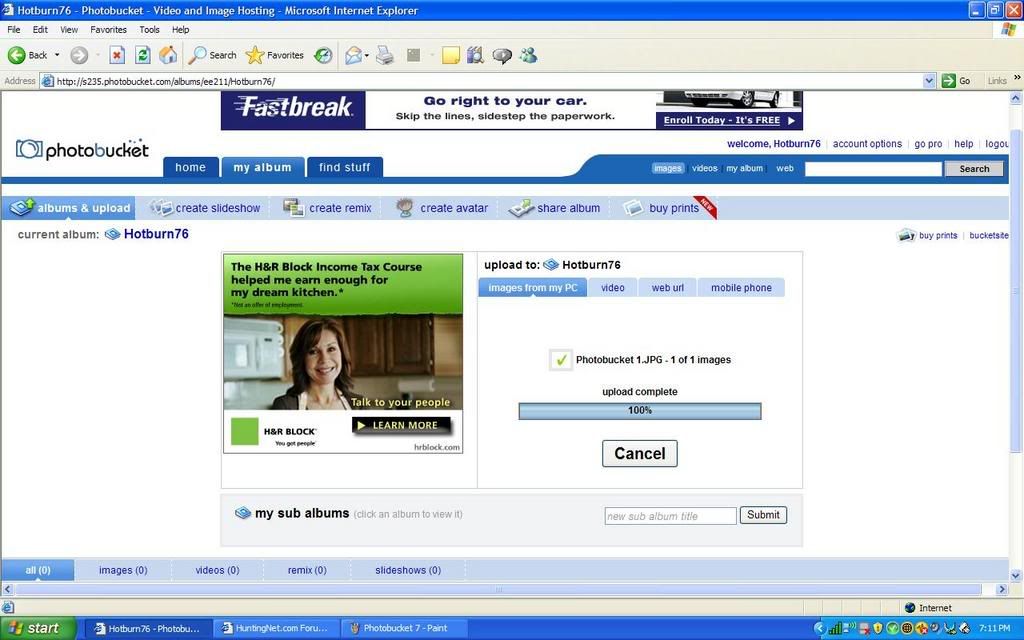 Step 9..... When youfinished uploading this is what you will see. If you see this smile, cause you are doing good, if not call smoke and ask forsome of his rum! Your going to need it, I have done all I can! LOL!! Also it will give you the option to upload some more if you need to, dial up guys may want to do one at a time.  Step 10..... After its done scroll down and see your upload. This is what you should see... 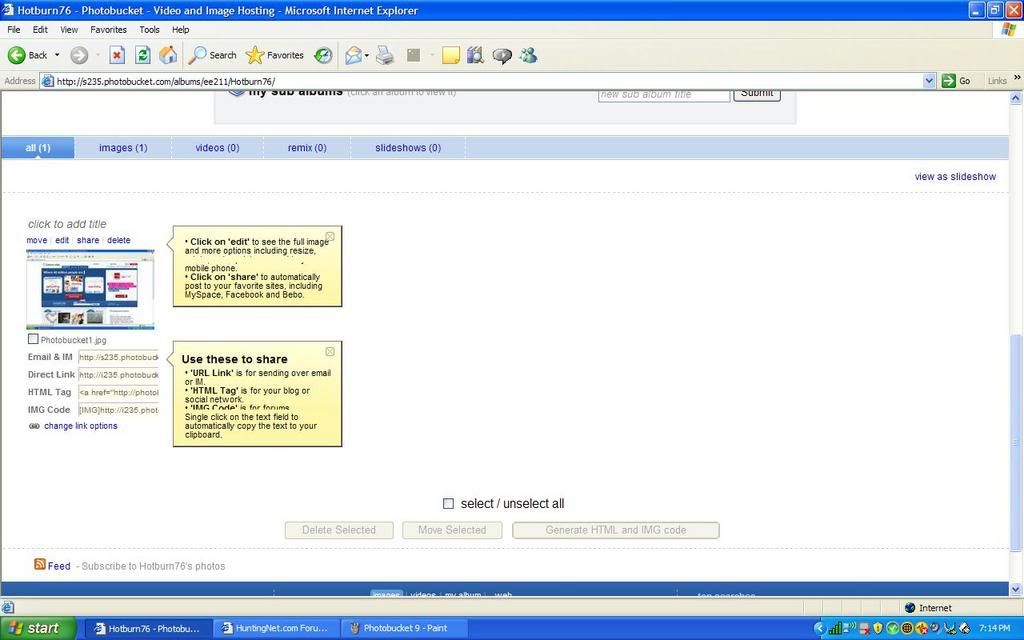 Step 11..... Now you will notice four links below your post, you wan the one that says Direct Link! I do not know what the top one and bottom twoare for but I know you need this one, Direct Link! If you put your mouse over it and click it will put it in your paste automatically, it not right click and copy it... 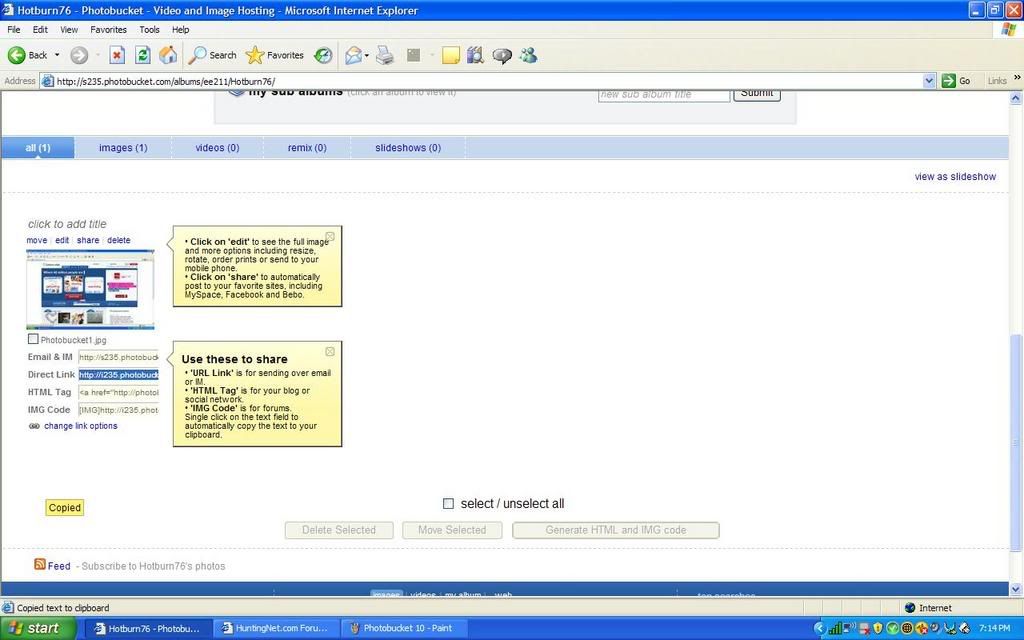 Step 12..... At this point you are done with Photobucket. Go into hunting net and start a post like normal. You will notice on your screen a little yellow box with a mountain in it at the far right of the post box tool bar right above where you are doing all your typing, click it.... 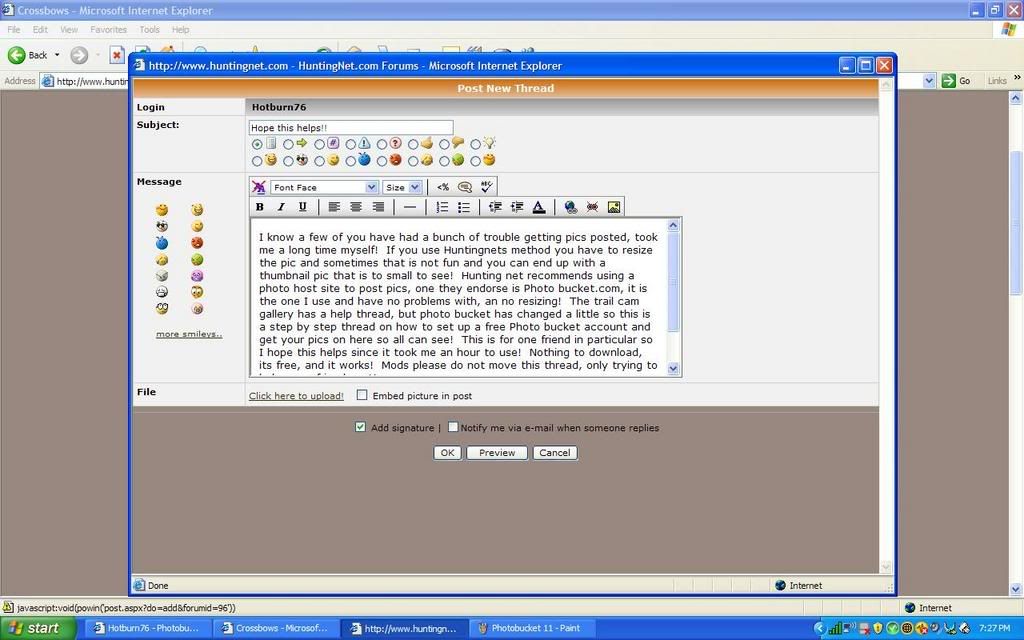 Step 13..... After you click it this box will pop up. Put your cursor in it and click paste. Sometimes huntingnet will already have the http//: in it, if you paste over it then good, if it's in there twice then its a no go and will not work.  Step 14..... After you paste, it should look like this. If so click OK, if not reread what I said or hit your head on the wall! LOL!! Also, as a side note it is important to know where your cursor is before you click the little yellow box with the mountain in it. Where ever the cursor is the pic will show up! If you were in mid sentence the thats what will happen. I always hit the return and start a new line before posting the pic.  When you clicked OK you should see your pic in your post. Go all the way to the right of pic and put your cursor and hit enter type some more. As you can see by this post you can put a bunch of pics in a post with no resizing! I think it also saves space for Huntingnet doing it this way. I hope this helps, please ask some questions if you have them, I will try and help. |
RE: Hope this helps!!
Greatinstructions HB! It is nice when someone takes the time to explain things so thoroughly.
|
RE: Hope this helps!!
I think Jason is trying to tell me something......Thanks...
|
RE: Hope this helps!!
Now my homepage wont open up.........can not find server.......got-to love liveing in the country..........
|
RE: Hope this helps!!
Yes James! That was an hour and a half worth of work for ya! You better post some pics or I will have to come down there and choke ya! LOL!!
|
RE: Hope this helps!!
defrag my system,got pic,now trying to get it inti post...........
|
RE: Hope this helps!!
lets see
 |
RE: Hope this helps!!
|
RE: Hope this helps!!
It lets me post the pics right off my computer. I use photobucket for some forums, but I don't need it for here. I wonder why? I just had to add the picture, then a box came up that said "upload" and that was it. took me about 10 seconds.
chris |
RE: Hope this helps!!
|
RE: Hope this helps!!
never mindI was wrong. It won't work like that now.
|
RE: Hope this helps!!
|
RE: Hope this helps!!
when I go to upload my files they areto big need to be under 200kb and all my pics are 453 and it dosnt let me edit size so Jason is trying to show me how.....
it kinda works now just have to figure out how to get pic rather then attachment....... |
RE: Hope this helps!!
now it won't let me do it that way... it worked the other day....you have to have "allow scripted links" turned on if you have a firewall. you also need to resize your pictures using your camera softwareor your photo utility. Then it should work for you. Then it should let you paste the url from photobucket.
chris |
RE: Hope this helps!!
I look into that one..
|
RE: Hope this helps!!
I had trouble when I first tried to do it too. EventuallyI got it towork!
|
RE: Hope this helps!!
|
RE: Hope this helps!!
yeah there must be something blocking it, I couldnt get it to work either |
RE: Hope this helps!!
It looks to me like you are not using the photo button on top that prompts you for your photo..
Odd, it'd not letting me do it either.. |
RE: Hope this helps!!
ORIGINAL: ranger56528 when I go to upload my files they areto big need to be under 200kb and all my pics are 453 and it dosnt let me edit size so Jason is trying to show me how..... it kinda works now just have to figure out how to get pic rather then attachment....... When your posting, just above your text there is, on the very right a tab that looks like a stamp (says ... add image), click it then paste link. OR if when your in the photoshop, click on the IMG CODE line, copy and then just paste dirrectly into your text. That will work as well. Hotburn76 you did very good. You should change the subject line to something like Posting Pictures 101 and then get it pasted just below TOP TEN CROSSBOW RULES at the top of the forum for immorality or long life. |
RE: Hope this helps!!
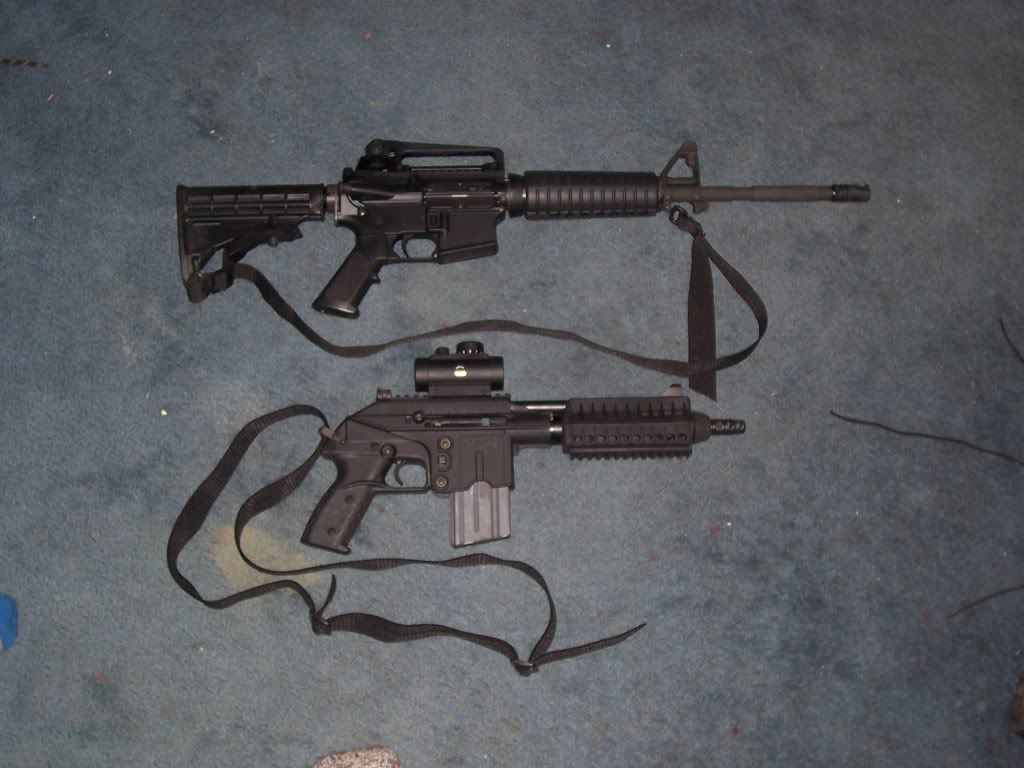 |
RE: Hope this helps!!
James you are doing good! You have a photobucket account set up so your on the right track! I do not know what they are talking about when they are saying image code, I do not have that on my tool bar. But you need the little yellow box with the mountain in it right above where you type. Then when you get your photo posted from photobucket it is the one that says direct link. The one you had of this pic I just copied that link you had in your post and put it in the box with the mountain in it, and it worked. I know you have windows vista, so maybe there is a slight chance hunting net is not viewed the same from your computer? But in one of your past post you pasted the little yellow box, and thats the one you need to click. Getting close........
|
RE: Hope this helps!!
James, if you want to do it the way I do then as you are making a post this is what you need to click, but before you click it you need to have your "Direct Link" already copied from photo bucket.
 Then this will come up. post the link in here and you should be good to go. Make sure you do not have two http:// things in the front of it and only one! Again, if you do not see all this it may be a Vista thing.  |
RE: Hope this helps!!
Thats what I do,but when I click on the "mountain/envolope" the only thing that appears in the box is //http. and nothing else,Ive done it exactly like the diections you posted....plus Ive tried other things in photo bucket.....
Iam just happy I can post pics at all now......will look into other reasons its not putting pic up right away but I have a feeling it has to do with Windows Vista... |
RE: Hope this helps!!
When the box comes up you have to paste you link in there, it will not come up on its own. The blank box with just the http:// is what we all see. Paste your link in that box and click OK and it should be good to go. Your getting there buddy... it will happen....
|
RE: Hope this helps!!
Ok will try when photobucket is done wit its maintenance...
|
RE: Hope this helps!!
ty much bro for the tutorial will definately give it a try.:)
|
| All times are GMT -8. The time now is 09:21 PM. |
Copyright © 2026 MH Sub I, LLC dba Internet Brands. All rights reserved. Use of this site indicates your consent to the Terms of Use.