
|
GPS question--Need Explanation
Just bought and experimenting with Garmin GPS Venture HC. Need to know is there a way to make a titled route as you go into a new unfamiliar area in the mts, say scouting? The way I see it now I can only move through the mts. waymarking different spots (rock pile, old foundation, etc) but if I do that I must remember which waypoints will return me to return to camp/truck or back to the newly found spot the next time. Any suggestions?
Jim |
Track log will show you the route you have taken to get to point B from Point A. It should be on automatically when you acquire sats and show up on your gps display a line, you can save track logs with different coloured lines for overlaying. Now if your refering to planning a route then you need to do that on your pc with the garmin mapping sw and upload it to your gps. It can be named, colour coded, etc
|
I have a venture, vista, and just got a new oregon!! So I know how unhelpful the instructions are. They dont' really give you examples of how to use a gps.
The venture can hold 10 tracks if I remember correctly. You need to find the track log page. If it's not in one of your pages you have to go to the main menu to find it. I generally clear everything before I go on a hike. Make sure your track log is turned on, it's at the top of the tracklog page. It's good that you are saving waypoints, that way you have referance points in case something goes wrong. If you go into setup you can change the way the pages display, either by changing the order, or changing the ones you want displayed. I usually page through map, tracks, compass, and trip data. If you clear your tracklog, then go on your hike, you can save the log when you are ready to start back. I save mine, then clear the log. That way I can change the color of the track I saved and differentiant where I'm going from where I've been. GPS'rs aren't so precise that you can follow the exact same path back, so keep that in mind. this is a non issue though since you don't usually have to trace your exact footsteps. I bring this up because I've been out with people that are so intent on following the same path they walk through briars because that's where the gps shows. GPS data is only kind of a suggestion. But like I said, it's close enough taht you won't get lost. You can get free topo maps for your venture at http://forums.gpsfiledepot.com/. I have the SEUS topo one. The venture cannot hold the whole thing, you will have to use mapsource to select your area and load it on your gps. I don't use my venture much since I've gotten the others. My vista holds the whole map, plus 20 tracks. The oregon holds 200 tracks! The vista and oregon have an electronic compass which is really nice when you are standing still trying to show someone the gps. It can be off though so I verify with a compass a lot. I really love bushwacking and hiking, a gps is really helpful for finding shortcuts and mapping out areas. Oh!! I almost forgot. You can save your tracks and waypoints and import them at gpsvisualiser. http://www.gpsvisualizer.com/map_input IT's so awesome! You can superimpose where you have been on satilite images. I have saved screenshots and snips to make maps of sorts! Here is an example 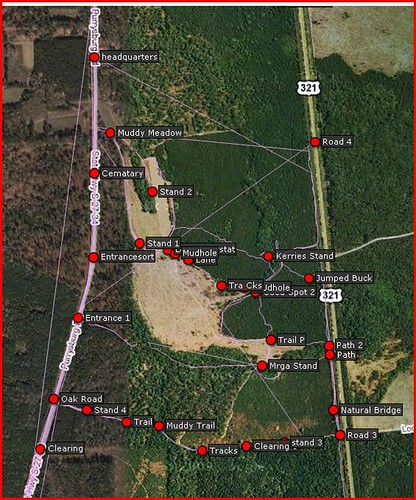 THose straight lines are where I turned the gps off, then on again. It connects the 2 tracks which is a pain. I now know to save and clear, then save again. The point is, you can go to that site and load your file and see where you have been. We look at our tracks at home, then we can determine where the deer might be traveling, we can see clearings and water sources that aren't by trails. There aren't a lot of topo features where I live and hunt so map and compass is of limited usefulness. What is useful to me is knowing where the roads are, and the easiest way to get to them. If my gps dies I at least have an idea of what direction to go in. Never fully trust a gps!!!! I love them and they have enriched my outdoor experience so much but I am aware of their limitations. I always have backup batteries and now spare gps's. I always have a compass. I always have at least a schematic drawing so I know at least what direction to go in. The odometer may be innaccuate when moving at a slow pace. Sometimes there is a significant differance between 2 units. My venture actually is more consistant than my others for some reason. You may already know most of what I just typed. I've seen folks go out with a gpsr and not know how to get the most out of it, the instructions don't really help in that. I aways waypoint my car. I make sure my gps can see the sky. I save my track before heading back. I make several waypoints as I walk. This is good because if you go in circles, for whatever reason, you can zoom out to figure out where you are. Hope this helps. |
| All times are GMT -8. The time now is 06:54 AM. |
Copyright © 2026 MH Sub I, LLC dba Internet Brands. All rights reserved. Use of this site indicates your consent to the Terms of Use.